Advertisement

Wednesday, 22 November 2017

BEST EVER OFFER

BEST EVER OFFER

Withdraw Your Favourite E-wallet Credit all time high withdrawal rate available for for 23-11-2017 to 27-11-2017.

1. Payza --> 64

2. WMZ --> 63.5

3. OKPAY --> 63

4. PM --> 64

5. PAYEER --> 63

6. ADVANCED CASH --> 63

7. EPAY --> 63

Monday, 6 March 2017

What is UPI App: Unified Payment Interface of India

What is UPI?

UPI is a payment system which facilitates the fund transfer between two bank accounts. This payment system works on the mobile platform. Sending money through the UPI app is as easy as sending a message. You are not required to give bank account details for the fund transfer through the UPI payment system. UPI is one of the most advanced method among all the digital payments.

Benefits of UPI

UPI is revolutionary. It will make the banking transaction a breeze. The RBI governor Rajan considers the launch of UPI as the Whatsapp moment.
  1. The UPI transfers the fund immediately. No restriction of holiday or working hours. The bank strike will also not affect the UPI payments.
  2. You do not require the bank account number and IFSC code of the recipient.
  3. You can transact from many bank account through a single UPI app.
  4. You are not required to wait up to 24 hours to send money to a new payee. Anyone would get money immediately.
  5. You can send bills and get money once the client approves it.
  6. You can use the Cash on Delivery without paying cash to the delivery boy. Just approve the bill and the delivery boy would get confirmation. 
  7. etc..etc..

How UPI is Better Than IMPS

Till now I was using the IMPS method of fund transfer. It also transfers fund immediately, 24 x 7. But, UPI has some advantages.
To send the money through the UPI, you don’t need to know about the bank of the recipient. It is necessary in the case of IMPS.
To use the IMPS, you need the bank account number and IFSC code of the recipient.
Only through the UPI, you can ask for the payments through the banking channel. In fact, one touch would complete the payment. You would agree that this method of getting payment would have more success rate.
You can’t pay for online shopping through the IMPS. But UPI gives the easiest way of online payment.

Virtual Payment Address (VPA)

The UPI payment system does not use the bank account details of the recipient. But, there should be an accurate identification of the money recipient. Ultimately, all this convenience is fruitful if the money goes in right hands.
So, every user of the UPI apps must have a unique ID. This unique ID is called as the Virtual Payment Address (VPA). Now you can frown on this new headache of remembering the VPA. But, don’t worry. It is going to be very easy. It would be as easy as a mail ID.
Rather, It would be similar to the mail ID. For example vivek@icici, Rajan@bob, Sohan@axis
In fact, the App provider bank would allot the VPA to each user. You can choose the VPA similar to the mail address.
You can give this VPA to anyone to receive the money. The app would itself keep storing the VPAs of the person to whom you have transferred the money. It is like saving contacts in Gmail. So, from the next time you don’t even require VPA of the recipient.

What is the Charge of UPI Transfer

This is the next question in your mind. What is the extra cost of this extra facility?
Actually, You would be surprised, this extra convenience doesn’t come with the extra cost. Rather, It is too cheap to believe.
A transaction through the UPI would cost about 50 paisa. Whereas the fund transfer through the NEFT costs at least Rs 2.5. On the other hand, the IMPS fund transfer charges minimum Rs 5. The payment through the credit cards is much costly however the seller bears it. Now seller can pass the benefit of low cost of the transaction to you.

How To Get UPI APP

As I have told you in the beginning, the UPI payment system works only through the mobile application. Thus, you need a smartphone and internet data pack.
There are several UPI Apps. You can choose any of them. Each bank can launch its UPI-based APP. Banks can also incorporate UPI features into their existing mobile application. Such as, the ICICI Bank has incorporated UPI into the iMobile and Pockets. In fact, most of the banks have incorporated UPI in their existing mobile application.
Hence, if you already have an app of a bank, the update would be sufficient. Otherwise, you can download the UPI enabled app from the google play store. As of now, the UPI enabled apps are made only for android. Soon, the windows and iOS-iPhone customer would also enjoy this.

Which UPI App should I Download

There are several UPI apps in the Google Play store. There are many apps e. g BHIM app, SBI Pay, Pockets, HDFC Mobile, iMobile, Phonepe, PNB UPI etc. You may be confused. Which App should you download?
Should you download the UPI enabled app of your existing bank?
Actually, you are free to download any UPI enabled app. It can be from your bank or from any other bank. Choose an App which has the better interface.
However, I understand, that the obvious choice would be the app from your bank. But, don’t fret to try the other apps. You can start with the BHIM app. It is basic app and very simple.

 How To Connect With Bank Account

The UPI has made the fund transfer very easy. But It is not a mobile wallet. Unlike the mobile wallet, you are not required to credit money into the UPI app.
Rather, the every fund transfers take place through your bank account. UPI app just acts as the link between you and your account. In other words, It has made the bank account transaction much easy and cheap.
So, to establish the link between you and your account, you have to connect UPI app to your bank account. This is a one-time process. It is done when you download a new UPI app. The UPI payment system gives you liberty to connect many bank account to one VPA. In fact, you can add all of your bank account to one UPI app. However, BHIM app, links only one account at a time.
While connecting to the bank account, you have to authenticate it through the card details and OTP. Once, your UPI app gets connected to a bank account, you can easily transfer fund to any person.

Send Money Through the UPI App

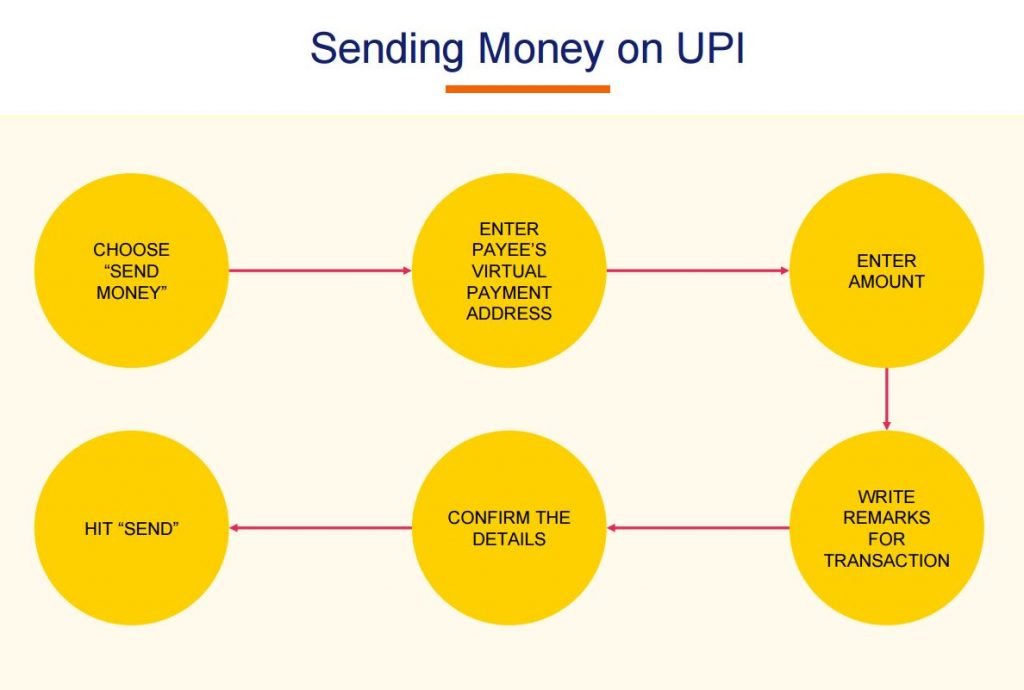
To send money through the UPI app, you have to go through these steps.
  • Open the UPI app using the passcode. The Passcode is mandatory to open the app.
  • Click on Send money. Choose the bank account from which you want to send money. If you have linked one account, you are not required to choose. When you send money using BHIM app, you would not see this option because it links only one bank account at a time.
  • Select the receiver. You can choose a receiver using the VPA as well as the bank account number and IFSC code. So, it is better to get the VPA of money recipient.
  • Add the VPA, if it is not already added.
  • Enter the amount and send the money. Before the final confirmation, you have to enter the MPin. In the BHIM app it is termed as the UPI PIN.
  • The money immediately gets credited to the account of the recipient.
fund transfer UPI

Security of UPI Payment

The united payment interface is as much secure as internet banking or mobile banking. To transfer the money through the UPI app, one has to go through the two-factor authentication.
  1. To open UPI app, you have to give a PIN.
  2. To transfer the money, again you have to enter the MPIN or UPI PIN.
All other transactions also go through these two two-factor authentication.


IMPS Transfer & MMID - Mobile Money Identifier..!!

MMID- Mobile Money Identifier

The Mobile Money IDentifier (MMID) is the key identifying detail of a user participating in a transaction. An MMID is a seven-digit number given to a customer upon registration with a bank for the service. In the seven digits of the MMID are four digits used to identify the bank of the user and three digits used to identify the account of the user.
A mobile number and a MMID will uniquely identify a customer’s account with the respective bank. The design of the MMID allows customers to operate multiple bank accounts linked to a single mobile number; each bank account has its own MMID. Additionally, since the MMID of the payee must be entered along with the payee's mobile phone number, it serves to reduce the possibility of an erroneous transaction when the payer inadvertently enters an incorrect mobile number.
The MMID is not intended to be a secret – it is simply an identifier and it does not give away any sensitive information about the customer. For example, a merchant will advertise his mobile number and MMID publicly in order to receive payments from the customers.

Why MMID
Today we can transfer money to any account using the bank account number and IFSC  through the NEFT and RTGS. But these two methods of money transfer has the limitation. The NEFT and RTGS doesn’t work round the clock. To overcome this problem the IMPS was devised.
It was thought that a mobile number can’t be shared with more than one person. No two person can have the saem mobile number. Hence, this number can be used to identify a person and his bank account. Banks generally keep the mobile number of their customers. It would make the money transfer possible without knowing bank account number.
But, this idea had a problem. One mobile number can be linked to many accounts. How would the system know the exact account number? To deal with this hurdle, the concept of MMID came. An MMID can be used only by one bank account. You can’t have same MMID with two bank accounts.
Now, when we use a mobile number and MMID both, we get to know the exact account. This combination has made the IMPS a successful mobile banking platform. The UPI is also based on this IMPS platform.


How To Get MMID
Now We know that each account can have an MMID. But banks don’t tell you MMID automatically. It gives only when you ask for MMID. Generally, It is given along with the mobile banking kit. The MPIN is also part of this kit. To get the MMID and MPIN, you have to activate the mobile banking.
You should know MMID to get money through mobile banking while MPIN is necessary to transfer money through the mobile. To get an MMID, you should be registered for mobile banking.
Registration for Mobile banking
Normally there are four ways of mobile banking registration.
  1. You can visit the bank branch and fill the form of mobile banking. You would get the MMID and MPIN at your mobile or communication address.
  2. You can also go the bank ATM and opt for mobile banking. After the confirmation, you get the SMS containing MMID and MPIN.
  3. You can also use the mobile app of the bank to generate the new MMID.
  4. You can also use the internet banking facility of the bank to generate MMID.
These are the common ways of getting MMID. However, I am presenting the specific method of getting MMID from SBI and ICICI Bank.
How To get MMID from SBI
  • The SBI customers get MMID with the welcome kit.
  • Customers  can also get MMID by visiting branch and filling form.
  • SBI customers can generate MMID through the SBI anywhere app. Go to  IMPS- Generate MMID.
  • Customers not registered for Mobile Banking Service can register their mobile number at SBI ATM to get MMID for the primary account linked to the ATM card:
Swipe your Debit Card > Select Mobile Registration> enter ATM PIN > Select SMS /Secure Code / IMPS > enter your mobile number > Confirm.
  • Customers not having ATM card / Customers having more than one account, can visit their Branch and apply for MMID, by filling up a form.
7 digit MMID number will be sent to you over SMS on the mobile number used for registration.
How To Get MMID from ICICI Bank
The ICICI Bank has these three ways to get MMID.
  1. iMobile Application
    Go to iMobile on your mobile phone >> Go to smart keys and services >> account services >> show MMID >> Your 7-digit MMID will be displayed.
  2. USSD
    Dial *525# >> ICICI Bank Mobile Banking menu will appear. Enter 7 for More Services >> Enter 4 for Generate MMID >> Enter the last 4 digits of the account number for which MMID needs to be generated >> Your 7-digit MMID will be displayed.
  3. SMS
      SMS MMID [space] [last 4 digits of your account number] to 9222208888 >> You will receive an sms carrying your 7-digit MMID for the bank account.
How To Use MMID for Fund Transfer
The combination of mobile number and MMID is the replacement of account number and IFSC code of the payee. If you know the MMID and mobile number of the pay you don’t need anything else to transfer the money. The MMID is used when we go through the IMPS platform of fund transfer. The other two platforms are NEFT and RTGS.
The IMPS mode of fund transfer works on net banking, mobile applications and USSD service of GSM phones. It means you can input MMID when you transfer money through the mobile app, USSD, and net banking. You would get the option of MMID. Note,  you should go through the IMPS to use the MMID. The UPI system is also based on IMPS. However, it uses the virtual payment address in place of MMID and mobile number. It is considered as the most advanced method of payment. Besides this, Now you can also pay to a person only by entering his/her Aadhaar number. It is called as the Aadhaar Enabled payment system.

Thursday, 26 January 2017

Happy 68th Republic Day and Recharge API Update..!!

Dear Customer,
  Now Indian users can Top-up his mobile and DTH through his favorite ewallet. All recharge order processed through Automatic API at working hours. 10 AM to 7 PM.

 Happy 68th Republic day, We proud our nation democracy and Respect it. We salute our country freedom fighter martyr.

Regards,
Exchange Zones

Regard website feature..!!

Dear Customer,
        Goodbye 2016, We had done lots of changes in our system in 2016.
    We are wishing you Happy and Prosperous New year 2017. We continuously working on provide our customer best and smooth service, to that endeavour we working on Recharge section, Once it done user can recharge his Mobile Prepaid, Postpaid and DTH through favourite E-Wallet through real-time recharge system. We working more secure to our system and services. If user had feedback or suggestion feel free send us at feedback@exchangezones.co.in